

Setup
Follow the PayPal setup instructions before configuring PayPal payments.Vaulting
To allow customers to tokenize their PayPal account for future payments, you need to contact PayPal and request that your account be enabled for Vault. Once Vault has been enabled on your PayPal merchant account, you can toggle the tokenization feature on within the PayPal connector settings in the dashboard.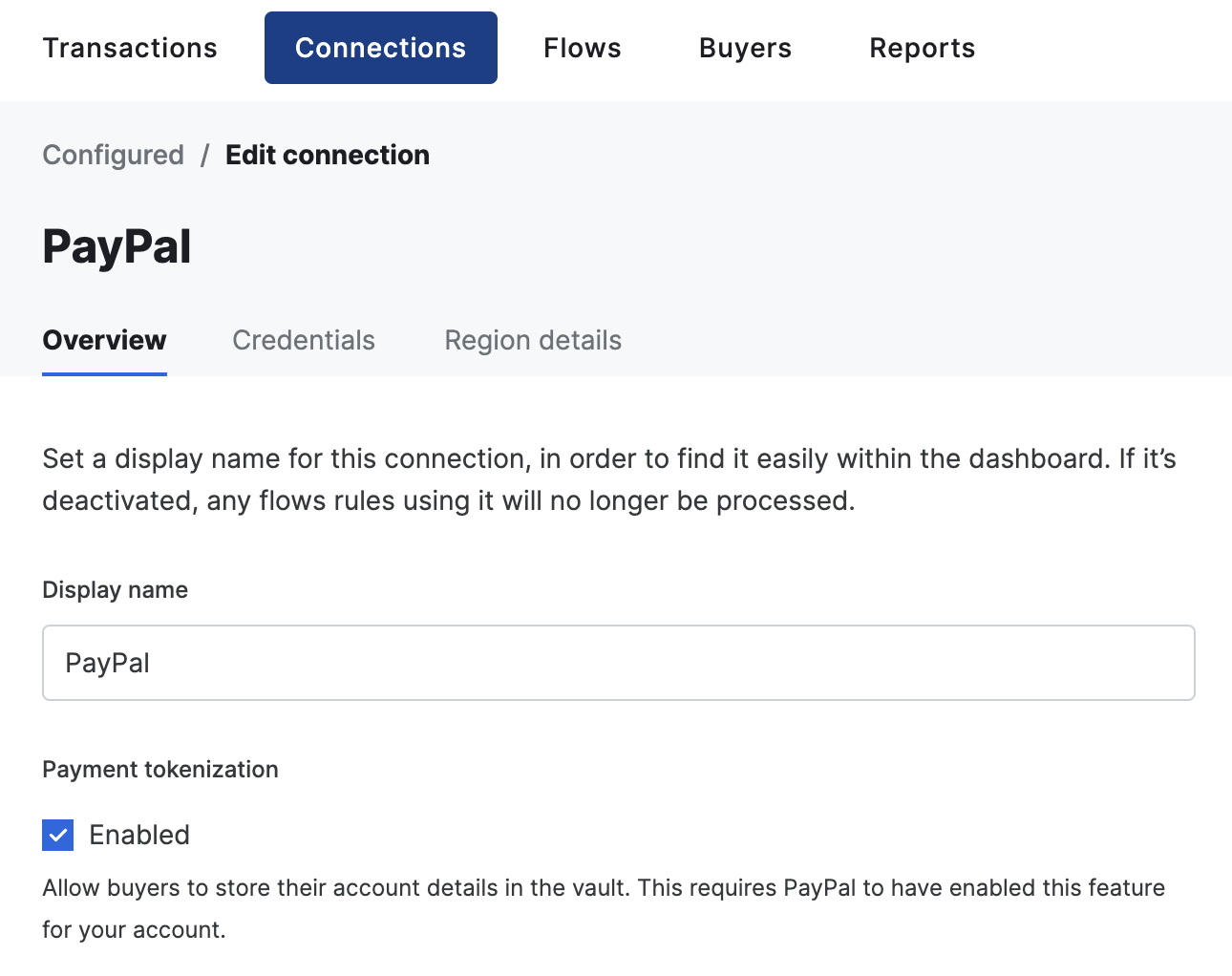
Ingest billing and shipping details
By default, billing, and shipping details received from PayPal are not imported. To enable this feature, head over to Connections → Configured and select your PayPal connector. Next, go to Credentials and toggle Import billing details and/or Import shipping details. When Import billing details is enabled, any of the user’s name, email address, and billing address are automatically imported into your transaction, merging it with any data already present on the transaction. Linked buyers are not updated, but only the snapshot of the buyer on the transaction. When Import shipping details is enabled, the user’s shipping address is automatically requested and imported into your transaction, merging it with any data already present on the transaction. Linked buyers are not updated, but only the snapshot of the buyer on the transaction.The ingestion of billing and shipping details is not available for tokenized payments.
Server-side shipping callbacks
When Import shipping details is enabled, you can configure PayPal to call your server whenever the buyer changes their shipping address or selects a different shipping option during checkout. This lets you return updated shipping costs and available options in real time. To enable this, passorder_update_callback_config in connection_options["paypal-paypal"] when creating a transaction:
When
order_update_callback_config is set and shipping ingestion is enabled, Gr4vy sets the PayPal shipping_preference to GET_FROM_FILE so the buyer’s shipping details flow through your callback endpoint rather than being provided upfront.
Checkout experience
You can customize the PayPal Checkout page by passing any of the following fields inconnection_options["paypal-paypal"] when creating a transaction.
"GUEST_CHECKOUT" for landing_page only takes effect if PayPal account optional is enabled in your PayPal merchant account settings. If the setting is not enabled, PayPal falls back to showing the login page regardless.locale is a hint to PayPal and may not always be honored. PayPal also determines locale from the buyer’s browser cookies and the configuration of its own SDK, so the effective locale can differ from the value you provide.shipping_preference is automatically determined by Gr4vy when not set. It is set to GET_FROM_FILE when order_update_callback_config is set and shipping ingestion is enabled, SET_PROVIDED_ADDRESS when a shipping address is supplied on the transaction, and NO_SHIPPING otherwise. Setting shipping_preference explicitly overrides this automatic behavior.Payment receiving preferences
By default, PayPal only settles payments automatically if the payment is in the primary currency of the PayPal merchant account. If you need to accept payments in additional currencies, you need to open a PayPal account balance in each of the currencies you intend to accept. Alternatively, you can configure your PayPal merchant account to automatically convert payments into the primary currency. If you receive a payment in a currency that your PayPal merchant account is not configured to accept, the payment enters a pending state and you need to log in to the PayPal merchant dashboard to trigger settlement, either by opening the required currency balance, or converting the payment into the primary currency of your PayPal account.FraudNet
FraudNet is a PayPal-developed JavaScript library that collects browser-based data to help reduce fraud. Upon checkout, the FraudNet library sends data elements to PayPal Risk Services for fraud and risk assessment. When creating transactions, the PayPal FraudNet library must be included on the checkout page for all transactions. When using Embed, the PayPal FraudNet library is included automatically. If you are using the API directly, you need to use the device fingerprinting library which includes the PayPal FraudNet library.Capabilities
Supported countries
Supported currencies
Integration
For PayPal, the default integration is through a redirect to PayPal’s hosted checkout page. Start by creating a new transaction with the following required fields.payment_method.approval_url and the buyer_approval_pending status.
approval_url so they can log in to PayPal, review the transaction, and approve the payment. After approval, the buyer is redirected to the redirect_url you provided when creating the transaction. Do not rely solely on the redirect - either poll the transaction or (recommended) rely on webhooks to detect the final status (for example capture_succeeded or failure states).
Direct integration
PayPal provides client SDKs for a direct integration where PayPal’s own checkout UI runs on your page or in your app. The two platforms differ in one important way:- Web renders PayPal’s Smart Button on the page before the buyer acts, and the button needs the PayPal
clientIdto load. To get that without creating a transaction on every page load, you preload the connection’sclientId/merchantIdfrom a standalone session, then create the transaction and PayPal order lazily inside the SDK’screateOrdercallback. - Mobile does not need this preload. PayPal’s native iOS/Android SDK is launched with an order that already exists, so you create the transaction when the buyer taps and hand the resulting
orderIdto the SDK — there is no button to render up front.
Both platforms below have Gr4vy create the PayPal order for you as part of creating the transaction. If you already run your own PayPal SDK integration and want to keep it, see Bring your own PayPal integration instead — you keep control of the order and hand Gr4vy the approved order id at the end.
- Web
- Mobile
The Smart Button renders on page load, so you preload the The response body holds just the two IDs. It contains no
clientId/merchantId and defer the transaction to createOrder.- On page load, fetch the standalone session to get the connection’s
clientIdandmerchantId. This requires thetransactions.writescope, so call it from your server. It creates no transaction and makes no call to PayPal.
orderId, because no order exists until the buyer clicks.This call is optional. The
clientId and merchantId are static connection values, so if you already have them you can skip the standalone session and pass them straight to the PayPal JS SDK. The session endpoint exists so you don’t have to hard-code or separately distribute the connection’s credentials to your frontend.- Also on page load, initialize the PayPal JS SDK with the
clientIdfrom the standalone session and render the Smart Button. Setcurrencyto the same currency as the order you create increateOrder(a mismatch fails the integration), and setintentto match the connection’s configured intent. The button defers the work to itscreateOrdercallback, so the transaction and order are created on click (steps 3 and 4).
- Inside the SDK’s
createOrdercallback, create a transaction with theintegration_clientset toweb. Keep this call server-side. Set the transactionintentto match the connection’s configured intent.
- Still inside
createOrder, use thesession_tokenfrom the transaction response to get the session data. This returns theorderIdand adefault_completion_url. It is meant to be called from the frontend and is not exposed in the SDKs, so call it with a plain request authenticated by thesession_token. Return theorderIdfromcreateOrderso the PayPal SDK can open the approval flow.
Complete the transaction
After the buyer completes the payment flow, the PayPal SDK provides anonApprove callback (Web) or a completion block/callback (Mobile). To finalize the payment, call the tokenized default_completion_url from the session response. This URL is safe to call from the client as it contains an embedded token.
On Web, navigate the browser to the URL (for example, window.location.assign(default_completion_url)) so it follows the HTTP 303 redirect back to your redirect_url. On Mobile, send a GET request to the URL from your completion callback.
intent=capture, the system captures the transaction.
Please refer to the PayPal SDK documentation for further guidance.
Bring your own PayPal integration
If you already have a working PayPal SDK integration, you do not have to rebuild it around Gr4vy’s session and completion flow. You can keep driving PayPal yourself and involve Gr4vy only at the end, by passing the approved order id when you create the transaction. Compared to the Web and Mobile flows above, the ownership is reversed:
The flow is:
- Create a PayPal order — either through your own backend call to PayPal, or through Gr4vy’s order pass-through below.
- Have the buyer approve it with your existing PayPal JS or native SDK integration.
- Create the Gr4vy transaction with the approved order id in
order_id.
Creating the order through Gr4vy
Gr4vy’s session endpoint can forward an order straight to PayPal’s Orders API, so you can retire your own order-creation endpoint and keep your PayPal credentials in one place. Sendaction: "create-order" with the order body in payload:
payload is passed to PayPal untouched and PayPal’s response is returned unchanged, so anything the Orders API accepts works here without waiting on a Gr4vy release. No transaction is created by this call.
id to your PayPal SDK exactly as you would an order created by your own backend. The same endpoint is also available per configured connection at POST /payment-services/{payment_service_id}/sessions if you need to target a specific connection rather than the definition.
Omitting
action returns the connection’s clientId and merchantId instead, as used by the Web flow above. An unrecognized action, or create-order without a payload, is rejected.Authorizing the approved order
Once the buyer has approved the order, create the transaction withorder_id in connection_options["paypal-paypal"]:
The order must already be approved by the buyer before you create the transaction, and the transaction’s
intent must match the intent the order was created with in PayPal (authorize or capture) - a mismatch is rejected before any authorization is attempted. Since approval already happened, this skips the buyer_approval_pending step - there is no approval_url to redirect to, and the transaction creation response returns the authorization or capture result directly.